


















Cloud Phone System For The Modern Workplace
Cloud phone systems and phone numbers remain an essential tool, and Vodia PBX modernizes the phone system for today's workplace, catering to the needs of contemporary companies where seamless communication, both internally and externally, is vital. Vodia PBX software turns mobile phones, laptops, tablets, PCs and standard VoIP phones into clients all of your employees can use for their communication needs.
Need help?
Contact Us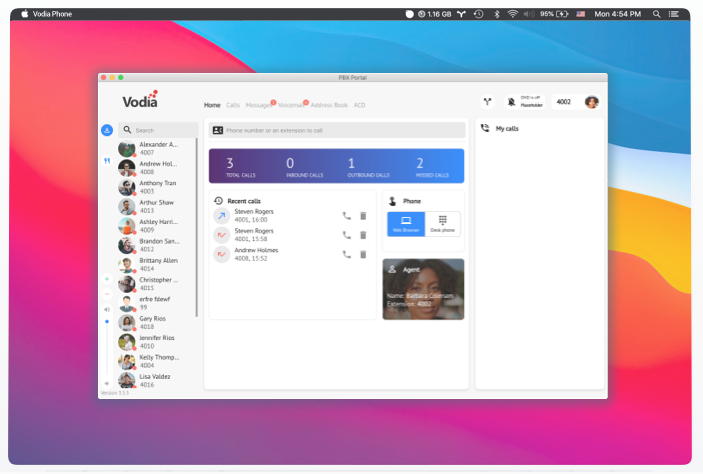
Why Vodia
Cost Effective
Optimized resource allocation means cost savings for businesses of all sizes.
Cloud-Based
No hardware maintenance, no outdated software, just internet dependent.
SIP Trunking
Connect your cloud PBX with the public telephony network.
Flexible
Easily adapts to various communication needs, integrating and customizing smoothly.
Feature Overview
All in One Softphone to make and manage calls
The Vodia desktop apps go far beyond what you know from traditional SIP soft phones. You can see the status of your coworkers, call or text them, see messages in your mailbox, see your call history, call recordings and even see what is going on in your ACD. And you can change your preferences in your PBX, like redirections, upload your profile image or timezone.
Windows Desktop App
You can use the Vodia PBX through a standard web browser without having to install an app: users can change settings, schedule conference calls or set their devices.
macOS Desktop App
You can use the Vodia PBX through a standard web browser without having to install an app: users can change settings, schedule conference calls or set their devices.
Android App
The Vodia PBX Android client is available from Google Play and runs on all major Android systems. The app supports calling, putting calls on hold, transferring calls and texting (SMS).
Apple App
Our iOS app is the latest addition to our fleet of softphones. Make and receive calls, listen and manage voicemails, message your colleagues all with our own iOS app.
Powerful Built-In Features
Extensions
Users connect to the Vodia PBX through extensions, and each extension can have multiple devices connected to it. These devices will ring in parallel when someone calls the extension, so a person can pick up the call on the device that suits him or her best. Each extension can have its own time zone, language, ringtone, address book and much, much more. Extensions may have administrative permissions; for example, for managing the central address book or for barging into calls. For each extension, working hours can be established and users can manually place them in do-not-disturb mode. There are many ways for redirecting calls.
Mailbox
Each extension comes with a mailbox so callers can leave messages. These messages can be shared in a group, moved to other mailboxes; users can also leave comments for mailbox messages. The PBX can also receive FAX messages and then send them to the user's email address, and FAX can be sent from the user's front end. Messages can be escalated to managers when the user is unable to retrieve it in time. The PBX can use the Google speech API to convert mailbox messages into text; these messages can then be sent to the user's cell phone as a preview of the message.
Auto Attendant
The auto attendant helps incoming callers find the right party for the call. Callers can use their keyboard to enter extension numbers or search the company directory by name. There are several ways to redirect incoming calls, based on time of call, and to present different announcements. A selection of pre-recorded announcements makes it easy to announce shortcut numbers, for example, for sales or support departments.
Groups
Simple hunt groups call a list of extensions up and escalate calls based on simple time rules. Groups can have their own ring melody and display the group name on phones, making which group is being called easy to discern. When necessary, users can be called on their cell phones when a call reaches a hunt group.
Call Center
For more sophisticated call distribution, the Vodia PBX comes with agent groups which are equipped to handle higher call volumes and sequentially distribute calls. While waiting, the PBX can play announcements and mix these announcements with music on the fly. Users can receive a call back when it's their turn, instead of holding. Agents can log in and out of the queues, and managers can see service level measurements like speed of answer. For outbound calls, lists of numbers-to-be-dialed can be uploaded into the ACD; the PBX can then dial those numbers automatically and distribute them to an agent, or the agents can use a code to dial the next number on the list. Virtual offices benefit from separate DID: each can have its own name and voice announcement. Calls can be recorded inside the PBX or sent to external recording devices.
Conferencing
Sometimes more than two people need to talk, and the Vodia PBX can mix multiple audio channels in spontaneous conference calls or in scheduled conferences. When setting up a conference, the PBX sends calendar events to the invited participants and, if needed, calls the conference participants into the conference. Rapid response conferences can be commenced when one of the participants calls into the conference room.
Paging
The PBX comes with extensive paging features that can be used with standard desktop phones and with overhead speaker equipment; it supports live paging and recorded announcements. Predefined pages can be triggered by events – for example, when a user calls an emergency number or when a group receives a call. Using the Google text to speech API, arbitrary texts can be sent to paging accounts through the API or from the app text interface. There are rules about which extension may do this.
CRM Integration
There are several predefined CRM integrations available, including Zoho, Salesforce and HubSpot; customizations for in-house CRM systems can be done through backend code. For hotels, the PBX integrates with mainstream PMS systems.
Address Book
The PBX keeps address books on user and domain level, so that each user can have their own contacts and companies can share contacts. Contacts can be imported through the web interface or from Google G-Suite and Office 365. The contacts are stored on the server, simplifying compliance and making it easier to switch between devices.
VoIP Phones
The Vodia PBX supports a great many VoIP phones through provisioning templates. Where available, the PBX uses secure communication for provisioning and calls. Button templates can be used to assign functions to buttons without touching the devices. Whenever possible, the PBX generates background images and ring tones, making branding easier for partners and corporate users.
Reporting
There are numerous reports available for users, managers and system administrators. The PBX proactively sends emails and SMS messages when important events are happening; for example, when a new voicemail arrives or a call is missed. Call reports can be sent daily, weekly or monthly. There are several ways to push call data records to external services for further processing.
Microsoft Teams Integration
Interoperability with Microsoft Teams
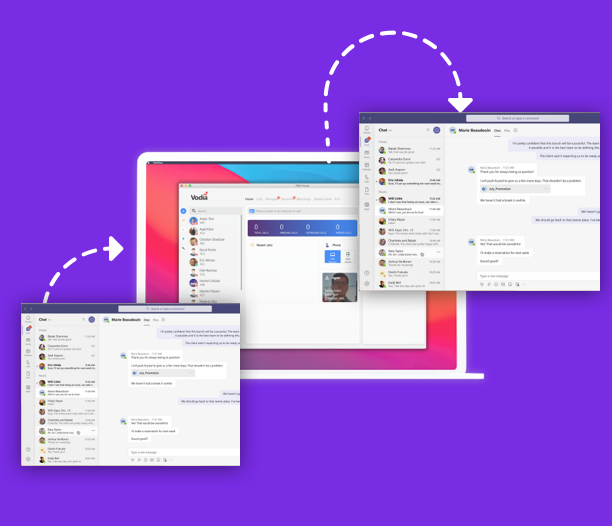
The Vodia PBX can act as an SBC for Microsoft Teams. Teams extensions can dial internal resources in the PBX, including overhead paging or other extensions using VoIP phones unavailable for Teams; the PBX can also terminate Teams calls into SIP trunks for outbound calls. Inbound calls can be sent to Teams extensions.
Learn More About TeamsDesk Phones & Soft Phones

Grandstream GXP2612P
A professional VoIP desk phone compatible with the Vodia PBX.

Grandstream GXP2170
A high-end IP phone with a large touchscreen and powerful features.

Grandstream GXP2615
A carrier-grade professional IP phone ideal for everyday business use.
Soft Phones
PC
Windows desktop app for making and managing calls.
Mac
macOS desktop app with the full softphone experience.
Android
Android client available on Google Play for all major Android systems.
iOS
iOS app to make and receive calls and manage voicemails.