



























Microsoft Entra ID
Ensuring identity security has become paramount in the evolving work landscape, particularly with the flexibility of remote app access. Establishing secure access to your network and applications starts with Azure Active Directory.
Need help?
Contact Us

Identity & Access Management
Ensuring identity security has become paramount in the evolving work landscape, particularly with the flexibility of remote app access. Establishing secure access to your network and applications starts with Azure Active Directory.
Azure Active Directory (Azure AD) serves as the bedrock of your cloud identity and serves as the security boundary for all Microsoft online services, including Microsoft 365. As an enterprise identity solution, Azure AD offers single sign-on, multi-factor authentication, and conditional access features to safeguard your users against 99.9% of cyber threats.
Microsoft Entra ID provides a comprehensive identity and access management solution that helps you manage user identities, control access to resources, and protect against security threats across your entire organisation.
Key FeaturesKey Features of Microsoft Entra ID
Everything you need for identity and access management across your organisation
Single Sign-On
Connect your workforce to all your apps, from any location, using any device. Simplify access to your apps from anywhere.
Multi-Factor Authentication
Help safeguard access to data and apps and keep it simple for users. Add an extra layer of security to the login process.
Conditional Access
Apply the right access controls to keep your organisation more secure. Enforce policies based on user, location, device, and risk.
Protect your business with a universal identity platform
The Azure Active Directory (Azure AD) enterprise identity service provides single sign-on and multi-factor authentication to help protect your users from 99.9 percent of cybersecurity attacks.
- Single sign-on simplifies access to your apps from anywhere
- Conditional Access and multi-factor authentication help protect and govern access
- A single identity platform lets you engage with internal and external users more securely
- Developer tools make it easy to integrate identity into your apps and services
Universal Identity Platform
Azure AD is the bedrock of your cloud identity and serves as the security boundary for all Microsoft online services, including Microsoft 365. It provides single sign-on, multi-factor authentication, and conditional access features to safeguard your users.
Single sign-on simplifies access to your apps from anywhere
Users only need one set of credentials to access all their applications, whether they're in the office or working remotely.
Conditional Access and multi-factor authentication help protect and govern access
Enforce security policies based on user identity, location, device compliance, and risk level to ensure the right people have the right access.
A single identity platform lets you engage with internal and external users more securely
Manage identities for employees, customers, and partners from a unified platform, extending your security boundary beyond organisational walls.
Developer tools make it easy to integrate identity into your apps and services
Accelerate adoption of your applications by supporting single sign-on and user provisioning with built-in developer tools and APIs.
Connect your workforce
Whether people are on-site or remote, give them seamless access to all their apps so they can stay productive from anywhere. Automate workflows for user lifecycle and provisioning. Save time and resources with self-service management.
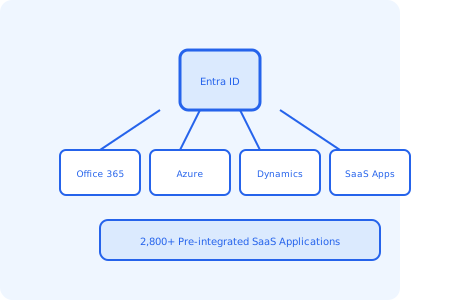
Choose from thousands of SaaS apps
Simplify single sign-on. Azure AD supports more than 2,800 pre-integrated software as a service (SaaS) applications.
Protect and govern access
Safeguard user credentials by enforcing strong authentication and conditional access policies. Efficiently manage your identities by ensuring that the right people have the right access to the right resources.
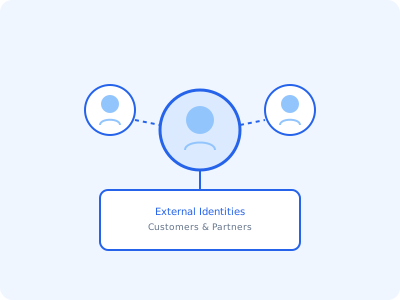
Engage with your customers and partners
Secure and manage customers and partners beyond your organisational boundaries, with one identity solution. Customise user journeys and simplify authentication with social identity and more.
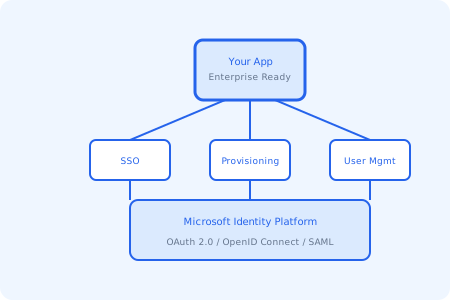
Integrate identity into your apps
Accelerate adoption of your application in the enterprise by supporting single sign-on and user provisioning. Reduce sign-in friction and automate the creation, removal, and maintenance of user accounts.
Useful Links
• Microsoft Entra ID Overview
Learn about Microsoft Entra ID — the cloud-based identity and access management service that helps your people sign in and access resources.
Read More →• Single Sign-On Documentation
Technical documentation for Azure AD Single Sign-On — including setup guides, SaaS app integration, and best practices.
Read More →• Multi-Factor Authentication
Learn how to enable and configure Multi-Factor Authentication in Azure AD to protect your organisation from compromised identities.
Read More →• Conditional Access Overview
Understand how Conditional Access policies work in Azure AD to enforce access controls based on conditions and signals.
Read More →Benefits of Using Microsoft Entra ID
Why organisations choose Microsoft Entra ID for identity and access management
Universal Identity Platform
Azure AD serves as the bedrock of your cloud identity, providing a single platform to manage identities for employees, customers, and partners across your entire organisation.
99.9% Threat Protection
Enterprise-grade single sign-on, multi-factor authentication, and conditional access features safeguard your users against 99.9% of cybersecurity attacks.
Seamless Remote Access
Whether people are on-site or remote, Entra ID gives them seamless access to all their apps so they can stay productive from anywhere, on any device.
2,800+ SaaS Integrations
Azure AD supports more than 2,800 pre-integrated SaaS applications, making it easy to connect your workforce to all the tools they need.
Granular Access Control
Conditional Access policies let you apply the right access controls based on user identity, location, device compliance, and risk level.
Developer-Friendly Integration
Built-in developer tools make it easy to integrate identity into your apps and services, supporting SSO and automated user provisioning.
Frequently Asked Questions
Common questions about Microsoft Entra ID
Microsoft Entra ID (formerly Azure Active Directory) is a cloud-based identity and access management service. It helps your people sign in and access resources, providing single sign-on, multi-factor authentication, and conditional access to protect against cybersecurity threats.
Single Sign-On (SSO) allows users to authenticate once with Entra ID and then access all their connected applications without needing to sign in again. This works across cloud apps, on-premises apps, and SaaS applications.
Multi-Factor Authentication (MFA) adds an extra layer of security by requiring users to provide two or more forms of verification when signing in — such as a password plus a code from their phone. This helps protect against 99.9% of identity attacks.
Azure AD supports more than 2,800 pre-integrated software as a service (SaaS) applications through the Azure Marketplace, making it easy to set up single sign-on for the tools your organisation already uses.
Yes. Entra ID supports External Identities, allowing you to securely manage customers and partners beyond your organisational boundaries. You can customise user journeys and simplify authentication with social identity providers and more.